Run every client from one desk

SARVAVIDHI

www.sarvavidhi.com/dashboardv2Live
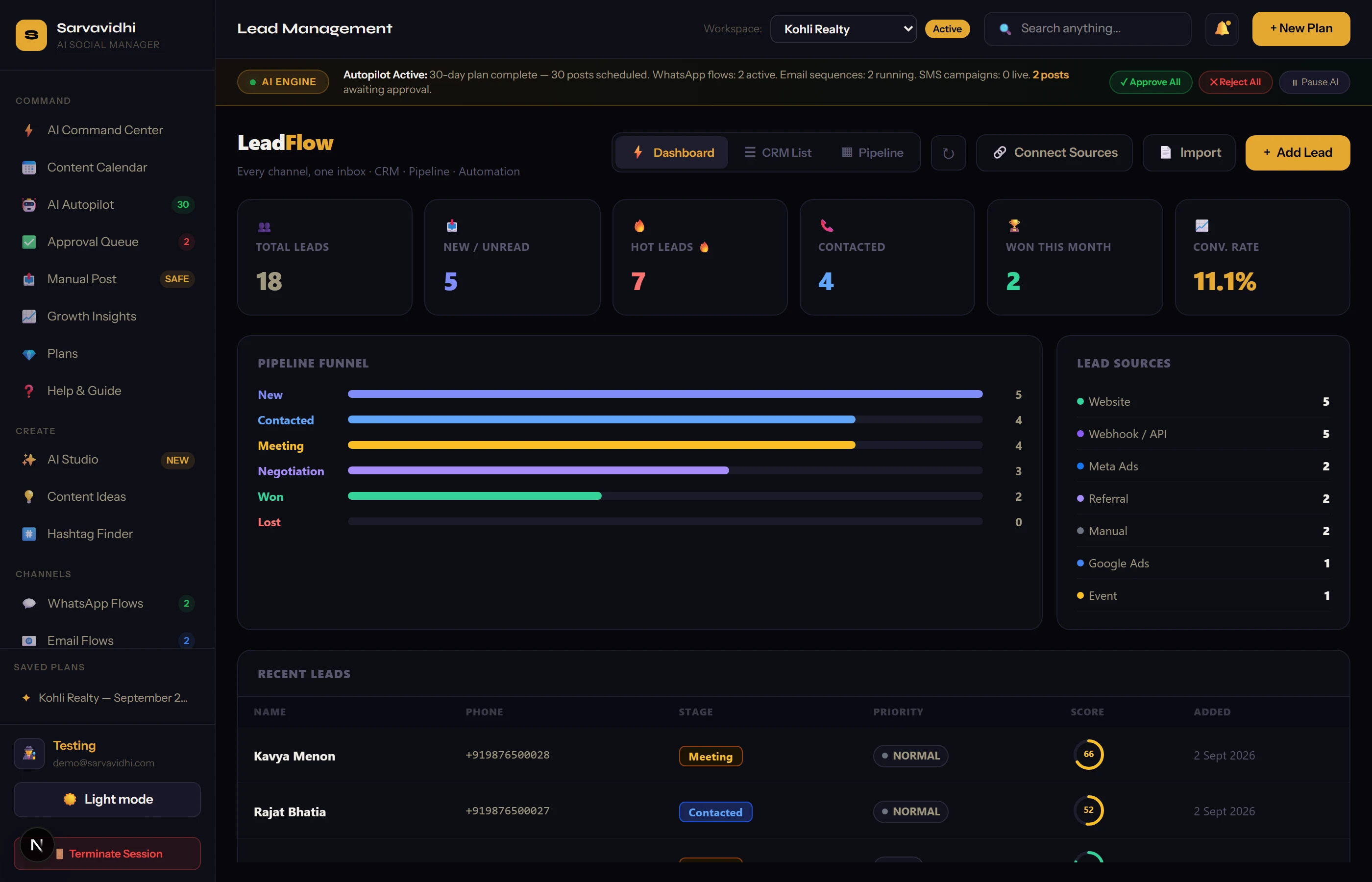
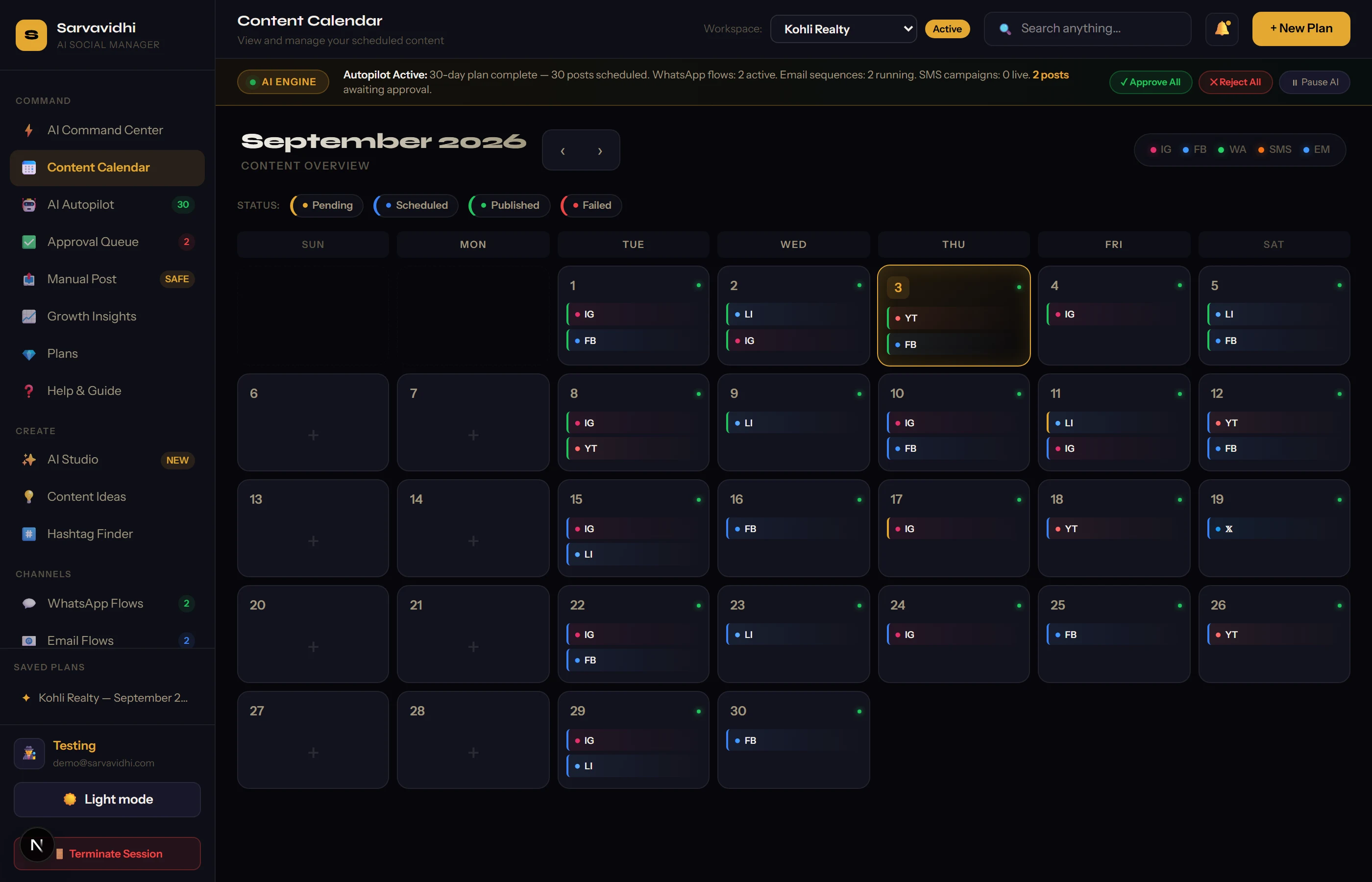
Workspaces, Calendar & Queue in the Sarvavidhi dashboard
www.sarvavidhi.com/dashboardv2Live
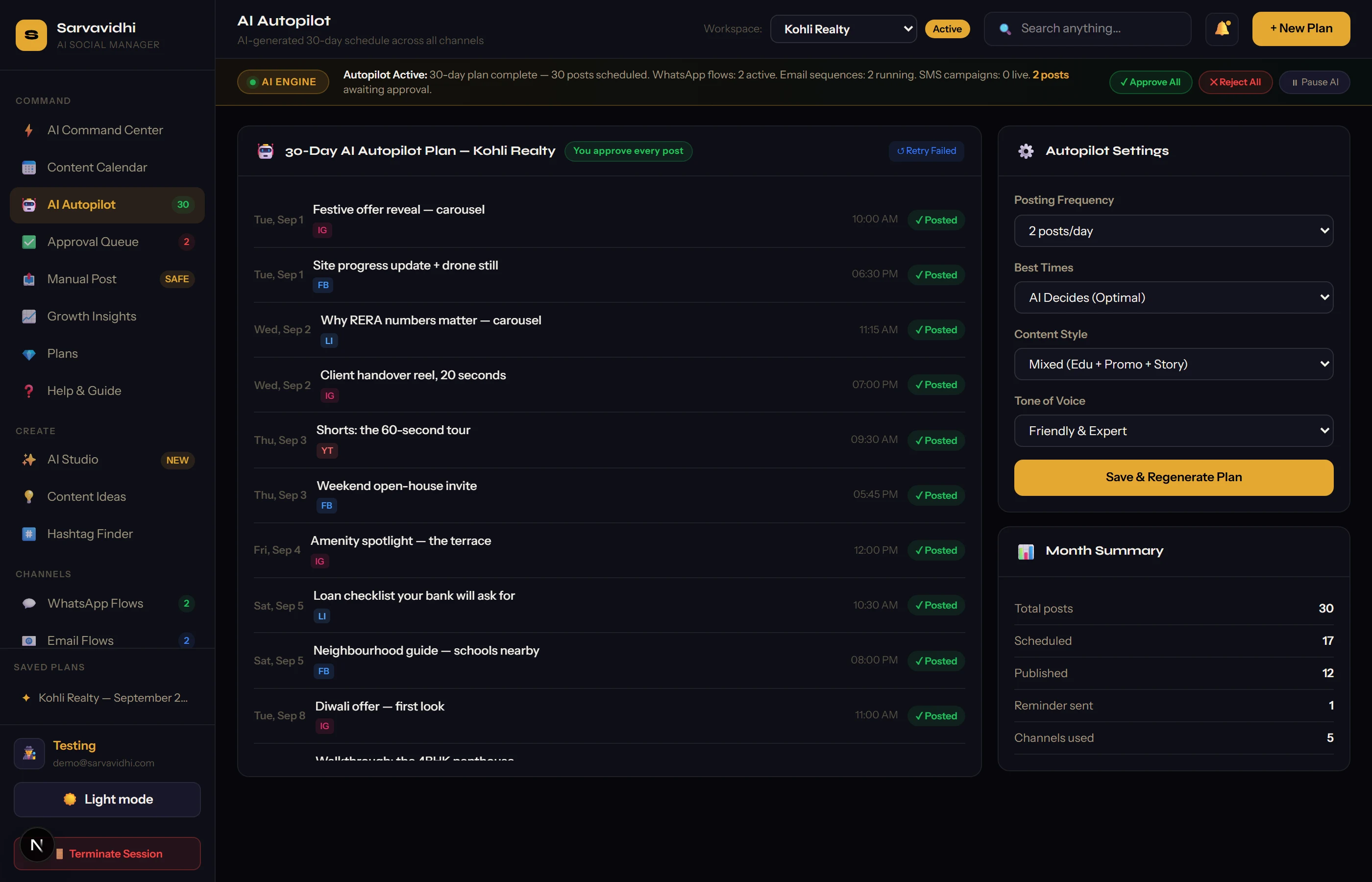
AI Content Plans in the Sarvavidhi dashboard
www.sarvavidhi.com/dashboardv2Live
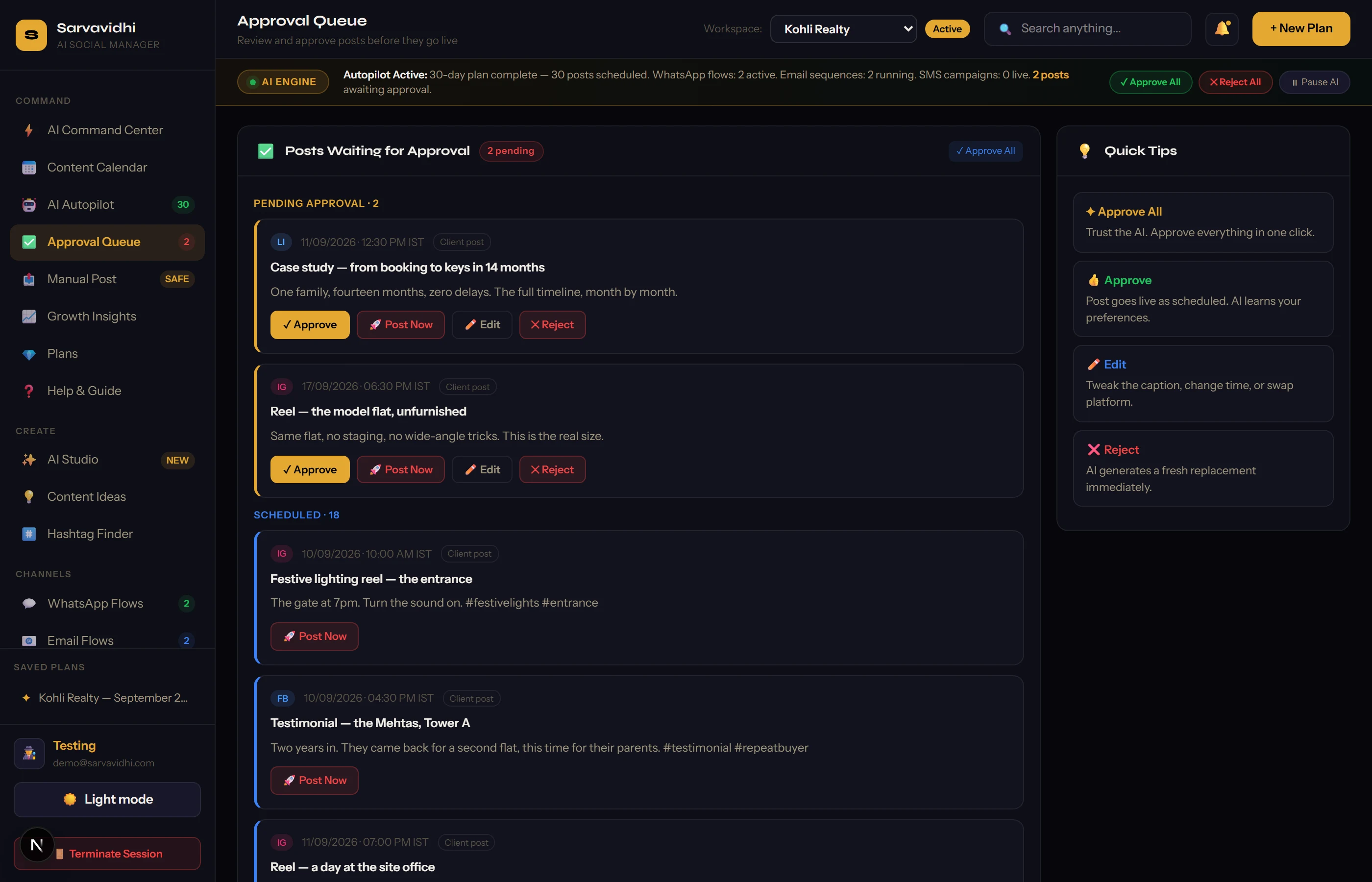
Approvals & Client Portal in the Sarvavidhi dashboard
www.sarvavidhi.com/dashboardv2Live
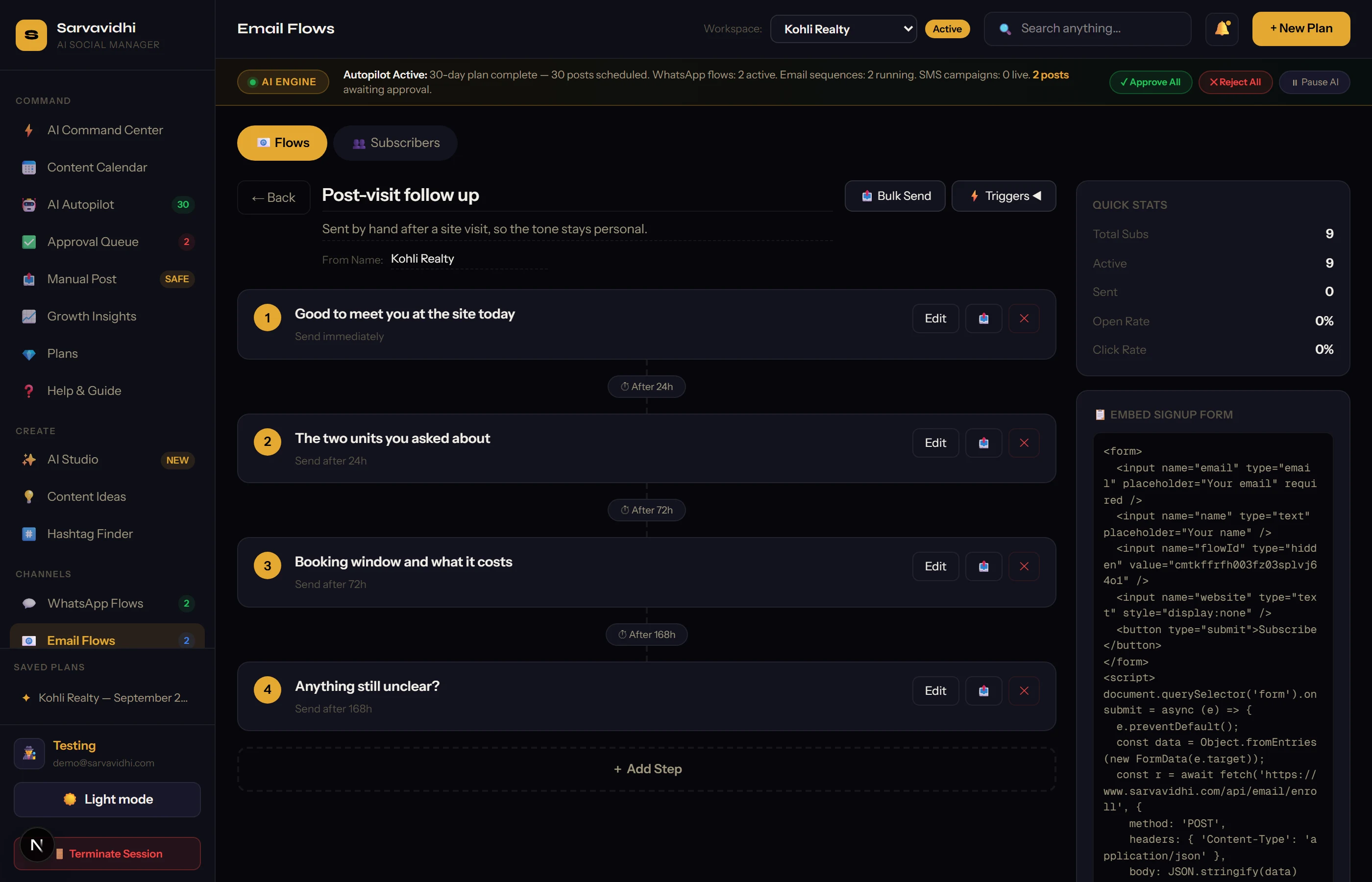
Email Marketing in the Sarvavidhi dashboard
www.sarvavidhi.com/dashboardv2Live
WhatsApp & LeadFlow in the Sarvavidhi dashboard
Open the screen
01 / 05 · Module
Workspaces, Calendar & Queue
←Swipe · tap to open→
0
Dashboard modules
0
Social channels
0
Automation engines
0
Login for every client

One dashboard to plan, approve and publish for every client you handle — with the email, WhatsApp and lead tools that usually cost four separate subscriptions.

Digital marketing agencies✦Solo social media managers✦Real estate teams✦Restaurants & cafes✦Clinics & salons✦Coaching institutes✦D2C brands✦Gyms & fitness studios✦Interior designers✦Event & wedding planners✦Travel agencies✦Local retail chains✦Digital marketing agencies✦Solo social media managers✦Real estate teams✦Restaurants & cafes✦Clinics & salons✦Coaching institutes✦D2C brands✦Gyms & fitness studios✦Interior designers✦Event & wedding planners✦Travel agencies✦Local retail chains✦
( 01 )How a month actually runs

Plan. Approve. Post.

Nothing in this loop is a black box. AI writes the draft, you edit it, your client approves it, and you approve it — and only then does it publish itself at the slot you picked. Your approval is the gate, so nothing goes out behind your back; after that gate you do not have to be at your desk.

Channels
Five connected
Facebook · Instagram · LinkedIn · X · YouTube
Approvals
Chased for you
A digest goes out on a cooldown, so it never nags
Publishing
Automatic, after you approve
Facebook · Instagram · X · LinkedIn go out on their own
Not connected?
You get reminded
The post waits, you publish it and mark it done
The life of one postApprove once, then automatic
Plan the monthAI draft
Autopilot drafts captions, hooks and hashtags in that client's voice
You edit itYour call
Rewrite, reschedule or drop anything inline in the queue
The client approvesPortal
They review in their own portal and leave suggestions on the post
You approve itYour gate
Until you do, nothing leaves the app — the post just sits in the queue
It publishes itselfAutomatic
Armed for its exact slot and posted to Facebook, Instagram, X or LinkedIn
It gets loggedInsights
Marked published, shown on the calendar, counted in Growth Insights
( 02 )The bit a scheduler cannot do

One Post, Three Views

The same post has three audiences — you, your client, and everyone else. A scheduler only ever shows you the first one. That gap is where the screenshots and the chat threads come from.

You · the queue
THU · 18:15Scheduled

Handover day at Kohli Greens — the Bansals got their keys this morning.

EditRescheduleSend for approval

You write it, or Autopilot does. Either way it is editable right here — no export, no re-typing.

Your client · the portal
THURSDAYNeeds you

Handover day at Kohli Greens — the Bansals got their keys this morning.

ApproveSuggest a change

Read-only, over a magic link. They approve or type what they want changed — on the post, not in a chat thread.

Everyone else · published
kohli.realty18:15

Handover day at Kohli Greens — the Bansals got their keys this morning.

♡ 21418 replies6 shares

Marked posted and counted. Disconnect the page later and this record still stays with you.

( 03 )Five modules, five screens

Inside The Dashboard

Open any screen full-size. These are the five places an agency actually spends its week.

01Module

The Desk

Ten clients, one login, and nobody has to open a spreadsheet.

Every client gets its own workspace. The switcher at the top scopes the calendar, the queue, the leads and the reports to whoever you are working on right now — so you never post a gym reel on a jeweller's page again.

Client switcherMonth calendarEditable queueMulti-tenant
1
login for all
Month
real calendar
Inline
edit & reschedule
Scoped
per client
A workspace per client
Posts, plans, leads and reports are scoped to the client you picked.
A real month calendar
Not a list pretending to be one. Plan a post on any date, drag the month forward.
Editable queue
Rewrite the caption, move the slot or drop the post inline. No modal maze.
Nothing bleeds across
Switch client and the whole dashboard changes with you.
02Module

Autopilot

A month of content, written in the client's own voice.

Describe the brand once. Autopilot drafts a full month of captions, hooks and hashtags around it, slotted onto real dates. You edit anything you disagree with, regenerate what you hate, and approve the rest. Nothing leaves the app on its own.

Brand voiceCaptions & hooksHashtagsRegenerate
Month
at a time
Per client
brand voice
Editable
every line
BYO key
your own Gemini
Plans, not one-off captions
A month arrives already spread across dates, with a hook per post.
Written for that client
The plan is generated per workspace, from that brand's own prompt.
Save & regenerate
Keep what works, regenerate the rest. The plan is yours to edit.
Bring your own key
Plug in your own Gemini key in Settings — encrypted at rest, never shown again.
03Module

The Portal

Stop sending screenshots. Send a link.

Share a read-only dashboard by magic link. The client sees the calendar, the published work, the leads and the activity — and nothing else. They approve posts, leave suggestions, and a digest email quietly chases whatever is still sitting unseen.

Magic linkRead-onlySuggestionsApproval digest
Magic link
no password
Read-only
by design
6-hourly
chase digest
Approve all
in one press
A link, not an account
The client opens a token-scoped page. No signup, no app to install.
They can only look
The portal never mutates your agency data. Suggestions come back as suggestions.
Suggestions on a post
They type the change they want on the post itself, not in a chat thread.
The digest does the chasing
A cron mails whoever still has posts waiting — capped so it never nags.
04Engine

Email Engine

A drip campaign, built out of blocks, sent on a trigger.

A block-based builder with six ready templates and a live preview, drip flows with real waits, five kinds of trigger, behavioural rules that fire on opens and clicks, subscriber lists with CSV import, and a bulk send that guards its own daily quota.

Block builderDrip flows5 triggersBehavioural rulesUnsubscribe
6
starter templates
5
trigger types
Live
open & click tracking
Guarded
daily send quota
Build it in blocks
Drag blocks, not HTML. Rich text, plain and raw HTML modes all present.
Flows that wait
Steps with real delays, edited in a sidebar, testable one step at a time.
Five triggers
Manual, signup, API, new client, post published or post failed.
Behavioural rules
Opened, clicked or bounced comes back from the provider and moves the subscriber on.
Lists & CSV import
Subscribers imported in bulk, each with their own unsubscribe token.
Quota you cannot blow
Bulk send counts the day's mail and stops before the provider does.
05Engine

Outreach

The lead lands, the flow answers, you see the whole thread.

A visual WhatsApp flow builder on your own Cloud API number, with broadcasts, contact lists and message logs. Beside it, LeadFlow: one signed webhook that any website form can post to, Excel and CSV import with column mapping, and stage, score and priority on every lead.

Flow builderBroadcastsSigned webhookExcel importStage & score
Your number
your Cloud API
1 webhook
any form
Excel / CSV
column mapped
Logged
every message
Visual flow builder
Steps, triggers and a state machine per conversation — not a blind blast.
Your own number
Plug in your WhatsApp Cloud API credentials. Sealed with AES-256-GCM.
Broadcasts & lists
Contacts grouped into lists, broadcast once, logged per message.
One webhook for every form
A signed URL any site can POST a lead to. No plugin, no integration project.
Import what you already have
Excel or CSV with column mapping. Unclear rows are flagged, never dropped.
Stage, score, priority
Every lead field is editable, and the last contact date is tracked for you.
Plan it✦Client approves✦You approve✦It publishes✦Lead lands✦Plan it✦Client approves✦You approve✦It publishes✦Lead lands✦
( 04 )What holds all of it up

The Foundation

Eight things every one of those modules quietly depends on. None of them is an add-on, a second subscription or a plugin you have to maintain.

01
Multi-tenant by design
Client workspaces are not a filter on one shared list — every post, plan and lead is scoped to its own workspace.
02
Your keys, sealed
Bring your own Gemini key and your own WhatsApp Cloud credentials. Stored with AES-256-GCM, never displayed again.
03
Connections you control
Facebook, Instagram, LinkedIn, X and YouTube connect over OAuth — and disconnect from Settings whenever you want.
04
History that survives
Disconnecting a page never deletes what you already published. Old posts stay behind a toggle, as your record.
05
Growth Insights
Activity-based analytics and a best-time read, computed off what you actually planned and posted.
06
Themes marketplace
Five self-contained WordPress themes, packaged and downloadable, for when the client also needs a site.
07
Help that ships with it
An in-app Help & Guide, plus a Gmail export path for teams that would rather send from their own inbox.
08
Delete means delete
One confirmed action in Settings removes the account and everything attached to it. Your data is not held hostage.
( 05 )Everything in the box
0tools, five groups, one login

The Toolbox

Screens that exist, in one dashboard, on the same login. Grouped here exactly the way the app groups them.

6Content
  • AI Content Plans
  • Month Calendar
  • Editable Queue
  • Assisted Publishing
  • Post Reminders
  • Manual Assist
5Clients
  • Client Switcher
  • Client Portal
  • Approval Digest
  • Post Suggestions
  • Per-client Scoping
7Email
  • Block Builder
  • Drip Flows
  • Five Triggers
  • Behavioural Rules
  • Subscribers & CSV
  • Bulk Send + Quota
  • Gmail Export
5WhatsApp
  • Flow Builder
  • Broadcasts
  • Contact Lists
  • Message Logs
  • Bring Your Own Number
4Leads & more
  • LeadFlow CRM
  • Signed Inbound Webhook
  • Growth Insights
  • Themes Marketplace
One workspace per client
Scope is enforced on every read, not painted on in the UI.
Approved first, then automatic
Your approval is the gate. After it, the slot is kept without you.
Your keys stay yours
Tokens and credentials are encrypted at rest with AES-256-GCM.
Nothing ships unapproved
AI drafts, you edit, the client approves. Three gates before anything is public.
( 07 )What you would otherwise pay for

Four Bills, One

Most agencies pay four vendors to do what one client actually needs. Here is the same job, and the honest version of how the alternatives handle it.

Usually a subscription
A scheduler
Calendar, queue, reminders
Usually a subscription
An email tool
Builder, drips, triggers, lists
Usually a subscription
A WhatsApp tool
Flows, broadcasts, templates
Usually a subscription
A small CRM
Leads, stages, follow-ups
SarvavidhiA global scheduling toolChat groups + spreadsheets
Clients per loginA workspace each, one loginPriced per workspaceOne giant group each
Content planningA month, AI-drafted in brand voiceManual, or a paid AI add-onA notes app
Client approvalTheir own portal, with suggestionsScreenshots over emailScreenshots over chat
PublishingAutomatic once approved — and it tells you when a token diesAutomatic, until a token quietly expiresSomeone remembers, or does not
Email marketingBlock builder, drips, triggers, rulesA separate subscriptionSent one by one
WhatsAppFlow builder on your own Cloud API numberNot includedTyped by hand
LeadsOne signed webhook from any formA separate CRMA spreadsheet
Your API keysYours, encrypted at restTheirs, on their planNot applicable
PriceFree, then custom pricingPer seat, in dollarsFree, until it costs you a client
If you leaveDelete the account and the data goes with itExport and hopeScroll up four thousand messages
( 08 )What it costs

Two Plans

No seat maths, no dollar pricing, no card on file. Start on Free, move to Pro when the planning actually starts paying for itself.

Get started, stay consistent
Free
₹0forever
  • Up to 10 planned posts / month
  • Assisted publishing on every platform
  • Basic Growth Insights
Create account
Grow on autopilot
Pro
Customtalk to us · 14-day trial
  • Unlimited planned posts
  • Email + in-app post reminders
  • Full Growth Insights & best-time
  • AI content plans (bring your own key)
  • Priority support
Start the 14-day trial

Pro is activated on your account after a UPI or bank transfer — no card is stored anywhere. Need white-label, a bigger team or a custom build? Talk to us.

Not sure which plan

Call Us To Book A Demo

Twenty minutes, screen shared, no slide deck. Tell us how many clients you run and we will walk the exact screens you would live in — the planner, the approval portal, the queue — set up with one of your own brands before you join.

  1. 01Name one clientTheir handles and what you normally post for them. That is the whole brief.
  2. 02We set the workspace upBefore the call, so the screens you see already carry that brand — not sample data.
  3. 03You drive itPlan a month live, send it for approval, watch the queue arm itself. Nothing publishes.
Mon–Sat · 10am–7pm IST
+91 8360267192

One call reaches the people who built it. Multi-client setups, white-label and custom builds are the same conversation.

Call nowEmail a time instead

A person replies · same working day

( 09 )Before you ask

Straight Answers

Yes — once you have approved the post. Facebook, Instagram, X and LinkedIn publish on their own at the slot you picked, on Meta permissions approved in August 2026. Approval is the gate, not the posting: nothing ever leaves the app while it is still sitting in your queue. Anything you have not connected — YouTube, for instance — takes the other route: we remind you with the caption and creative ready, and you post it.

Your account is created and then activated by us — usually within a working day. It is a manual check that keeps the platform clean, so you may briefly see a 'pending' screen after your first login.

For AI content plans on Pro, yes — you plug in your own Gemini key in Settings. It is encrypted at rest and never displayed again, and it means your usage is your own, not rationed out of a shared pool.

They get a read-only portal over a magic link. They see the calendar, the published work, the leads and the activity, and they can approve posts and leave suggestions. They cannot edit your data.

By UPI or bank transfer, after which we activate Pro on your account. No card is stored anywhere on the platform.

Yours. You connect your own WhatsApp Cloud API credentials and the flows, broadcasts and templates all run on your number, under your own approvals.

Import them. Excel and CSV both work, with column mapping, and any row we cannot read clearly is flagged for you rather than dropped.

Delete your account from Settings and every post, contact, lead and connection goes with it. Disconnecting a single page is a separate, smaller action that never deletes your published history.

( 10 )A real person replies

Talk To A Human

Tell us how many clients you run and we will show you the exact screens you would use. Send us one client's handles and we will set up a sample workspace before the call.

( 11 )Where this starts

Plan Your FirstClient Month

No card, no installation, no onboarding call you have to sit through. Create the account and plan a client's month today.

www.sarvavidhi.com · MSME Certified · Built in India